```html
Unity Integration
GraphView API
Real-Time Evaluation
Instant Feedback
Modular Design
Extensible Architecture
A node-based scoring system that allows developers to visualize, customize, and optimize game scoring in real time. Traditional hardcoded scoring is inflexible and hard to maintain. With Graphic View Score System, create complex scoring logic through an intuitive visual interface without constant code changes.
Our online games need a flexible scoring system that can handle complex logic, multiple player actions, and dynamic events. Traditional hardcoded scoring is inflexible and hard to maintain.
With Graphic View Score System, we built a node-based editor that allows developers to visualize, customize, and optimize game scoring in real time. This system has been successfully implemented in multiple online games, including HoGo Hot Mini Games Hub.
The system bridges the gap between game designers and programmers by providing a visual interface for scoring logic that requires minimal coding knowledge while maintaining technical precision.
The foundation of the Graphic View Score System
A simple node structure for calculating scores in a mini-game:
// Score Node Implementation
public class RewardNodeView : BaseNodeView
{
public int rewardAmount = 10;
public string rewardType = "Coins";
private IntegerField rewardField;
private TextField typeField;
public override void Initialize(string titleText, Vector2 position, string type = "Reward")
{
base.Initialize("Reward", position, type);
AddInputPort("In", typeof(bool), Port.Capacity.Multi, false, isStaticPort: true);
RefreshExpandedState();
RefreshPorts();
}
}
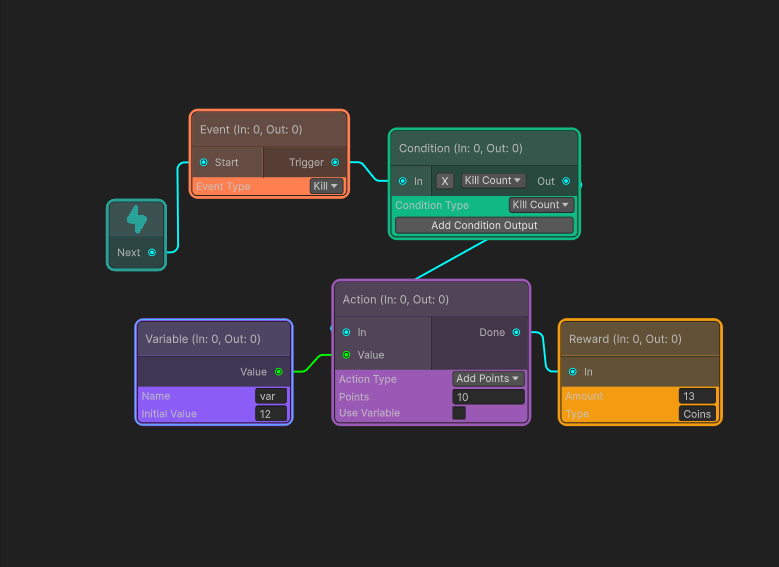
The building blocks of the scoring system
Starting point for score flow. Initializes score evaluation process.
Properties: StartValue, AutoTrigger
Events: OnEvaluationStart
Represents player/game events (Collect Coin, Kill Enemy). Outputs score changes.
Properties: EventName, Points, Multiplier
Events: OnEventTriggered
Branching logic (if score > X then …). Allows complex conditions and decision trees.
Properties: ConditionType, Threshold, Comparison
Events: OnConditionMet, OnConditionFailed
Executes scoring actions (AddPoints, MultiplyPoints, ApplyBonus).
Properties: ActionType, Value, Duration
Events: OnActionCompleted
Final node to collect and display score result. Connects to UI systems.
Properties: OutputFormat, DisplayStyle
Events: OnScoreFinalized
Extendable base for specialized scoring logic. Developers can create custom implementations.
Properties: CustomData, ScriptReference
Events: OnCustomEvent
Comprehensive functionality for modern game development
Nodes update scores instantly as the game runs. Developers can see calculations happening in real-time.
Intuitive drag-and-drop for node creation and connection. No coding required for basic setup.
Full clipboard support with keyboard shortcuts (Ctrl+C/V) for efficient workflow.
Complete history management with unlimited undo/redo operations for safe experimentation.
Automatic detection of broken edges, invalid connections, and null references with visual feedback.
Quick search to add new nodes by typing their names. Contextual suggestions based on current graph state.
Persist graphs as assets for reuse across projects. Supports multiple save formats and versioning.
Theming support with Unity Style Sheets. Different visual styles for different node categories.
Visual feedback when hovering over or selecting edges. Shows data flow direction and status.
How to implement the system in your projects
Attach ScoreEvaluationManager
Add to a GameObject in your scene
Load Saved Graph Asset
Assign your .asset file to the manager
Connect Game Events
Link enemy kills, item collection, etc. to EventNodes
Start Evaluation
Call Evaluate() method when needed
Bind OnScoreUpdated Event
Subscribe to receive score changes
Update UI Elements
Send values to Text, Slider, or Progress Bar components
Show Visual Feedback
Animate UI when scores change significantly
Handle Final Scores
Process results from OutputNode for end-game screens
To extend the system for multiplayer games:
Why this approach transforms game development
Create complex scoring rules without writing code. Perfect for designers and non-programmers.
Rapidly test and modify scoring rules. Change mechanics in minutes instead of hours.
See exactly which node failed or caused issues. Visual debugging saves hours of troubleshooting.
Add custom node types and behaviors. The system grows with your project requirements.
Save and share scoring systems across multiple games. Create templates for common patterns.
Watch data flow through the system with animated energy particles showing the exact path of score calculation.
The visual flow of data through the scoring system
The system visualizes data flow as energy moving through the graph. When a node is activated, energy pulses along connected edges to subsequent nodes, creating a clear visual representation of the execution path.
This visualization helps developers understand exactly how scoring is calculated and where issues might be occurring in complex scoring logic.
Pro Tip: Watch the energy flow when debugging to see exactly which path your scoring logic is taking through the graph.
As you modify nodes or connections, the system instantly recalculates the score and visualizes the changes. This immediate feedback loop enables rapid iteration and testing of scoring rules.
// Example of real-time evaluation
public void UpdateScore() {
var result = entryNode.Evaluate();
Debug.Log($"Current Score: {result}");
uiManager.UpdateScoreDisplay(result);
}
The evaluation process follows the graph connections, passing data from node to node until reaching the output, with each node potentially modifying the score value.
Real-world implementations of the scoring system
A simple scoring system where players collect coins to earn points. Each coin adds 10 points to the score.
Implementation: This basic system can be set up in under 5 minutes using drag-and-drop, making it perfect for rapid prototyping.
A more complex system that rewards players for consecutive actions with increasing multipliers.
Implementation: This system demonstrates the power of conditional logic in the node system, creating engaging gameplay mechanics with visual programming.
A sophisticated scoring system for a puzzle game with multiple stages, time bonuses, and perfect run rewards.
Challenge: This complex scoring system would require significant code without the node system, but with our visual approach, it's intuitive and easy to modify.
The visual layout clearly shows the branching logic and data flow through the complex scoring system.
See the Graphic View Score System in action or contact us to implement it in your game